SIP Logging
The LanScape Centrex Proxy Server® allows you to generate a log file
of all SIP transactions that have been processed. This log file can be
very useful when you debug your VOIP domain. Also, you can use the log
file and the logged SIP transactions to ensure that user agents you deploy
are functioning and interacting with the proxy properly. The SIP log file
that is generated is opened when the proxy starts execution. The log file
is then closed when the proxy terminates. You should only view the log
file after the Centrex Proxy Server® has been terminated.
If you require real time SIP protocol logging (i.e. Viewing the SIP protocol
data as it is being received and transmitted), then you should
enable the remote SIP logging capabilities of the proxy. The Centrex Proxy
Server® comes with a SIP log server application you can use for remote
SIP protocol logging. The SIP log server is a Windows console application
called SipLogD.exe. This server application is installed on your machine
when you install the Centrex Proxy Server® software. For further information,
please see the documentation for the SipLogD server application.
Alternatively, real time remote SIP logging can also be accomplished using
the "Custom Plug in" DLL interface and the default plug in DLL
that comes with the proxy server. The default plug in that is shipped
with the Centrex Proxy Server® allows you to send SIP protocol packets
to a log server in real time as they occur. For more information, please
read the information associated with the "Custom Plug in"
DLL interface.
The following dialog is used to specify SIP log settings:
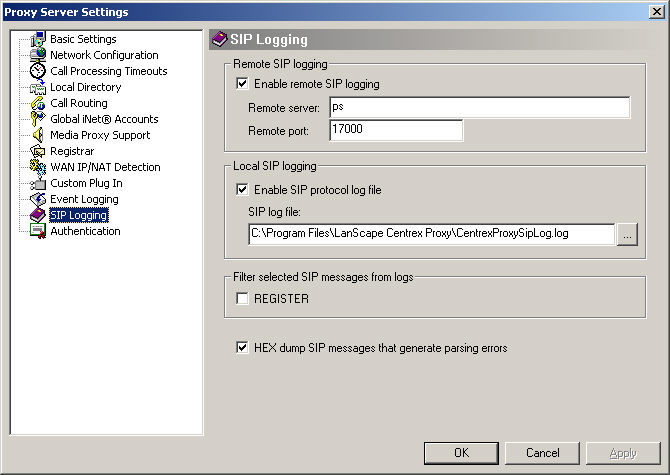
Enable
remote SIP logging:
Check this box if you want the
Centrex Proxy Server® to send all received and transmitted
SIP protocol messages to a remote SIP log server. Note: if you do not
need SIP logging, we suggest you disable this capability. Enabling remote
SIP logging slightly reduces proxy performance. For most deployments,
you should only enable this capability while you are debugging your VOIP
domain.
Remote server:
Allows you to specify the IP address
or host name of a remote SIP log server.
Remote port:
Allows you to specify the destination
UDP port of a remote SIP log server.
Enable SIP protocol log file:
Check this box if you want the
Centrex Proxy Server® to create a SIP log file as it executes.
Note: if you do not need SIP logging, we suggest you disable this capability.
Enabling SIP log file generation slightly reduces proxy performance. You
should only enable this capability while you are debugging your VOIP domain.
SIP Log file:
This
setting allows you to specify the location of the SIP log file that will
be created.
Filtering
specific SIP messages from the SIP logs:
You
can configure the proxy to filter specific SIP messages from being logged
in the SIP log file or from being sent to a remote SIP log server. Check
all SIP message types below that you want filtered from SIP logs.
REGISTER:
Checking
this option will filter all REGISTER SIP messages from all SIP logs.
Other
useful settings:
HEX dump SIP
messages that generate parsing errors:
This
setting will force the Centrex Proxy Server® to hex dump to all enabled
SIP log destinations (file or remote log server) a hex dump of any received
SIP message that could not be parsed by the proxy. This setting is useful
for debugging deployments.
|




 What
did you think of this topic?
What
did you think of this topic?